ML-Powered Gesture Recognition for Apple Vision Pro
June 2026 · Trifork
Houdini · PyTorch · Core ML · visionOS · Swift
When you build virtual training applications and user testing tools for Apple Vision Pro, you quickly run into a problem: the interactions people perform in XR are highly specific. A technician grabbing a virtual valve. A trainee pressing a virtual button. A user giving a thumbs up to confirm a selection. Recognising these gestures reliably matters — and rule-based approaches only get you so far.
In user training and testing scenarios specifically, this variation is significant: different people, different hand sizes, different ways of moving. A gesture recognition system that works well for one user needs to work just as well for the next — whether they're operating a virtual valve, confirming a selection, or navigating a training module.
The goal was a machine learning classifier that could recognise a defined set of hand gestures directly from Apple Vision Pro's hand tracking data, running on-device via Core ML.
In action
The video below shows the complete pipeline — from data collection on the Vision Pro, through training and Core ML export, to live inference running on-device.
The pipeline
The pipeline covers the full ML lifecycle: data collection, preprocessing, model training, and on-device deployment.
Data is collected directly on the Vision Pro using a purpose-built visionOS app — ensuring the training data matches the exact hardware and tracking characteristics the model will encounter in production. The model is trained in PyTorch and deployed via Core ML, running entirely on-device with no network dependency.
Particular attention was paid to making the model generalise across different users, hand sizes, and orientations — the practical requirements for a tool used in real training and testing scenarios with varied participants.
The data collection app
A dedicated visionOS app handles both data collection and model evaluation. It runs in two modes: one for collecting labelled training data, and one for running live inference to verify model quality in practice — testing on real people rather than relying solely on validation metrics.
Several interaction design challenges are unique to Vision Pro and required careful handling during development. The resulting app is a reusable tool that can be extended to support new gesture classes as requirements evolve.
Results
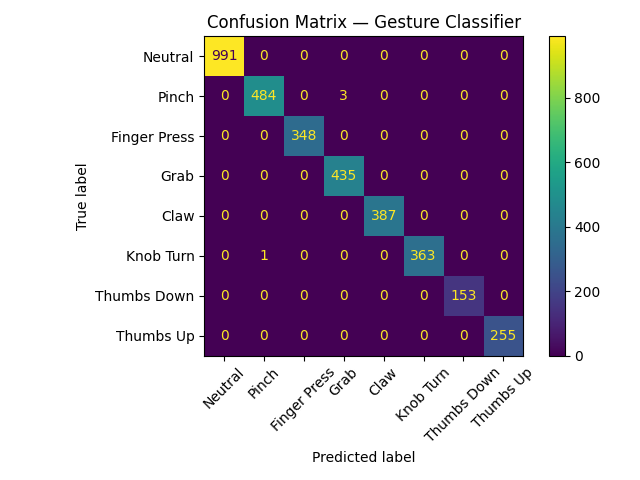
The classifier recognises eight gesture classes — including grabs, pinches, directional thumbs, and a knob turn — with 99.4% accuracy on held-out validation data and reliable real-world performance across different users.
The pipeline is designed to be extensible — and in practice, the best results come from tailoring gestures to each project. Adding new classes is a matter of collecting additional labelled samples and retraining, making it fast to build exactly the gesture set a given application needs. The data collection app can also be shared directly with clients, letting their own users contribute training data — which feeds straight back into the pipeline.
This work is being used internally at Trifork to improve gesture recognition in XR applications for virtual training and user testing.